E-bike interface
Unplug the display. Plug in Kurant.
Replace your e-bike's display with your phone. The Kurant module plugs in where the stock display was: speed, battery, power and assist show up large, with settings explained in plain words.
- KT controllers: bench-verified
- Board rev. 0.2 and R7 enclosure: in development
- Kickstarter campaign planned: pre-launch list open
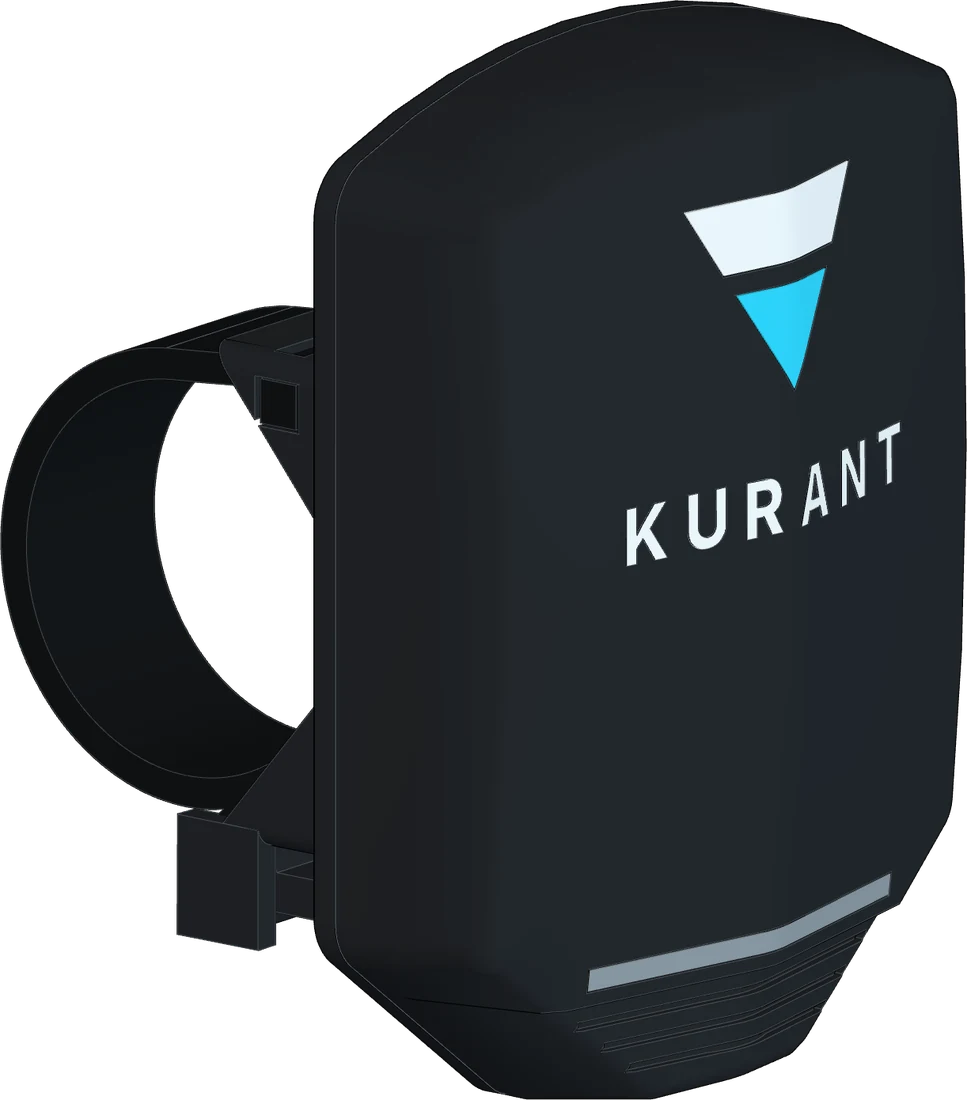 One-piece shell, one continuous seal
Tool-free clip, 22.2 to 35 mm bars
Three status lights
Status lights · demo
The same rules and colours as firmware 0.6, tested on a computer; the test on the rev. 0.2 board is next.
01The app, live
Your ride screen, in your browser
The app's simulator runs right here, on a virtual bike. Nothing is sent: try it.
- AssistTap a bar to change level, or OFF.
- Speed modeTap STREET · 32 to see the mode and its limit.
- SettingsThe gear opens the settings, described in plain words.
Simulated values, illustrative map. The real app reads the module over a wireless link.
Settings while stopped
02Before · After
Your bike already has the technology. Kurant gives you a better way to use it.
The controller, motor and battery stay the same. Only the display changes: the stock one goes in a drawer, your phone takes its place.
The stock display
- A few numbers on a small segment screen
- Error codes to look up in a manual
- Settings hidden behind codes (P1, C5…)
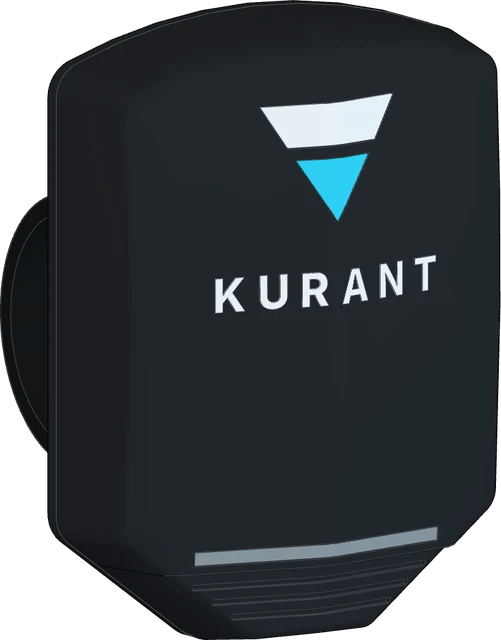
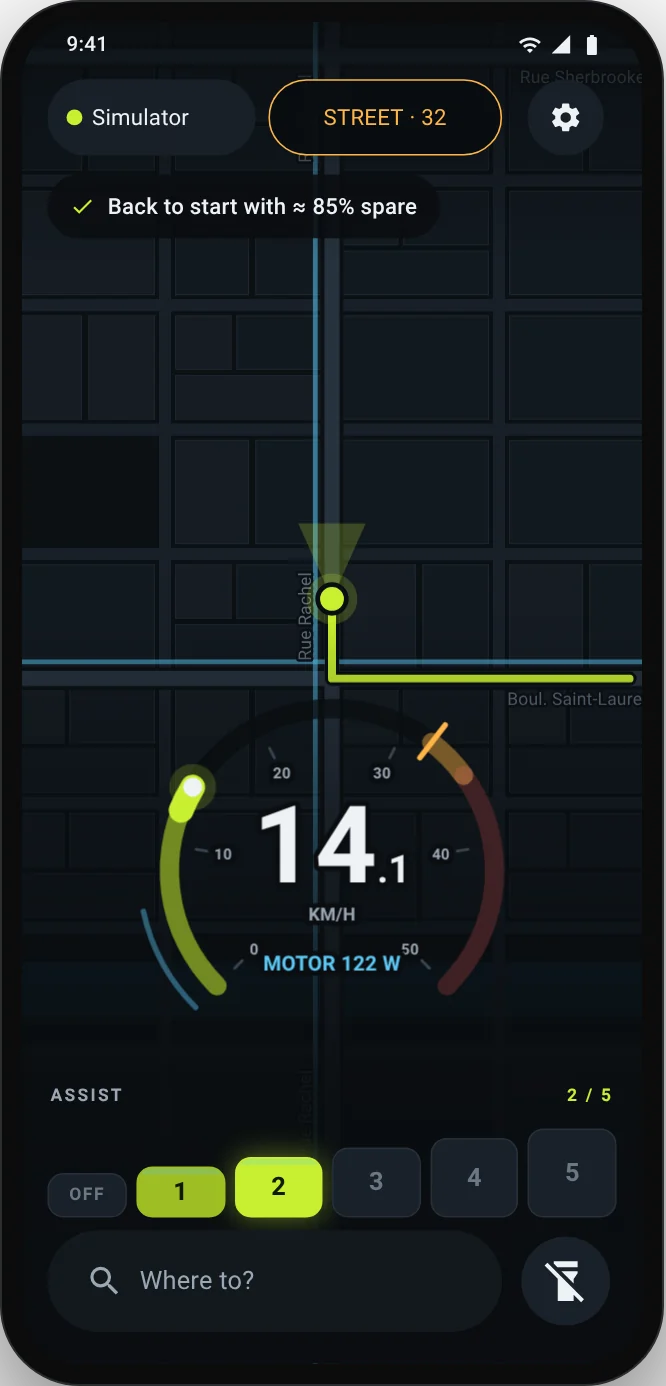 Ride screen
R7 module
Your phone and the module
- Speed, battery, power and assist, large
- Error codes explained in plain words
- Every setting described in plain words, while stopped
Before: illustration. After: the app in simulation and a rendering of the R7 design files. Photos of the prototype on a bike will follow the first enclosures.
03How it works
Three steps, no soldering
The module is the same for every bike: only the cable changes from one brand to the next. KT first; other brands next, in order of votes, each once it's verified on a real controller.
Unplug the stock display
Keep it: it plugs back in any time, no tools.
Plug in the module
In its place, on the same connector, with the cable for your brand (KT at launch). The module mounts on the handlebar.
Open the app and ride
On iPhone or Android, it finds the module and recognizes the controller. Turn the bike on from the app: data shows live.
What you need: a controller whose compatibility is verified, and the cable for its brand. A brand that looks similar or an identical connector isn't enough: every controller is verified on the bench before it's announced.
Check compatibilityone cable per brandwireless
The controller stays in charge of the motor, battery and sensors. The module keeps the bike running, even if the phone disconnects.
04Compatibility
Will it work on my bike?
Choose your system to see where it stands. After KT, the system with the most confirmed sign-ups goes on the bench first: every sign-up counts as a vote.
- Researchedin development
- On the bencha controller under test
- Bench-verifieddata and settings measured
- Road-confirmedby riders
My setup
Choose your bike's system and voltage to see the result.
How do I find my system?
- Display The model is often printed on the display or on its back: KT-LCD3, LCD5, LCD8, VM-T8, S866…
- Connector On Bafang, the display cable's connector tells you the system: round with 5 pins, or triangular.
- Label The controller's brand is on its label, for example KT36/48SVPRL. If in doubt, copy it into the form.
- Battery The voltage is printed on the battery or the charger.
- Bike The brand and model help too: add them when you sign up.
Can't find your bike? Sign up anyway: choose “Other brand” and describe it. These answers guide the next profiles.
05The R7 module, opened
Straight from the design files
- On the front handlebarNear where the display cable comes out, facing you, on the same connector as the stock display.
- A one-piece shell, one continuous sealThe seal runs all the way around the back plate. 29 mm thick, 41% less than the first prototype.
- The board, held without screwsRibs and pads keep it in place, rattle-free.
- Two screws and a tool-free clipThe clip twists onto the module and grips 22.2 to 35 mm bars. Three lights show the module's state.
Drag the model to turn it. Model from the design files (revision R7): first printed prototypes are next, and the final enclosure may still change.
Loading the 3D model…
06What you see
Your whole ride, at a glance
Speed, battery, power and assist, in an interface designed for the road. The demo at the top of the page runs in your browser with simulated values.
While riding
- Speed
- km/h
- Motor power
- W
- Battery
- V · %
- Assist level
- 0 to 5
- Brake
- on / off
- Error codes
- explained in plain words
Depending on the controller, some data may not be available. The app says so instead of showing a made-up value.
When stopped
- Wheel size
- in
- Speed limit
- km/h
- Modes
- Street · Offroad
- Lights
- on / off
- Ride history
- on your phone
- Module updates
- through the app
Each setting is described in plain words, with its current value, before you change anything.
07Safety
Once on, the bike never depends on the phone
These rules are part of the module's and the app's design. The log posts the bench tests, including the one with the phone cut off.
- No phone
The bike keeps running
The module keeps the link with the controller on its own. A dead phone, a closed app or an update in progress does not cut the assist.
- > 0.5 km/h
No settings while riding
Above 0.5 km/h, or when the speed is unknown, sensitive settings are locked.
- 1.5 s
No frozen values
With no new data for 1.5 seconds, the screen shows “--” instead of an old number.
- Verified
Settings open only after verification
A setting can be changed only once its encoding has been measured on a real controller. The most important ones need a typed confirmation.
- 32 km/h
Street mode by default
Out of the box, speed is limited to your province's legal maximum: 32 km/h in Quebec.
- Offroad
A mode for private land
It switches on only when stopped, with a 1.5-second press followed by a confirmation. On public roads, a bike set above 32 km/h no longer counts as a power-assisted bicycle. The rider is responsible for how this mode is used.
08Development log
Built in the open, measured on a real controller
Every step is posted once it's measured on the bench, and so are the problems found. Here are the latest entries.
Where Kurant stands
Done
- First printed circuit boards received
- First test on the bike: a problem found and fixed
- Every KT display setting captured on the bench
Now
- Board rev. 0.2 ordered
- R7.1 shells for the beta units, printed in ASA
Next
- Beta tests on real bikes
- Kickstarter campaign, date announced to the list
- Delivery in Canada, about 6 months after the campaign
09Why Kurant
What you get, compared honestly
What's in the box, and what Kurant does more (or less) than the other ways to replace your bike's display.
In the box
- The Kurant R7 modulePlugs in where the display was
- The cable for your brandKT at launch
- The tool-free clip22.2 to 35 mm bars
- The appFree, iPhone and Android, no account
Not included: a phone mount. Use your own; one with charging is a good idea for long rides.
| Stock or replacement display | EggRider V2 | Kurant | |
|---|---|---|---|
| Price | Often under CAD 100 | USD 106 to 145 | CAD 159, CAD 119 for the first 100 |
| What you look at | Small segment screen | Display and buttons on the bar | Your phone, large |
| Settings | By code (P1, C5…) | In the app | In plain words, while stopped |
| App | None | iPhone and Android | iPhone and Android, free |
| KT controllers | Yes, same brand | Not listed by the maker | Yes, bench-verified |
| Buttons on the bar | Yes | Yes | No: assist changes on the screen |
| Water resistance | Depends on the model | IP65 | Designed sealed, test to come |
EggRider V2 price and compatibility taken on November 18, 2026 from the maker's page. Kurant isn't affiliated with any of these brands.
10Kickstarter campaign
Be among the first to ride with Kurant
Kurant will be funded by an all-or-nothing Kickstarter campaign. Pre-launch list members get the link before anyone else: it's the shortest way to the 100 modules at CAD 119.
- Goal
- CAD 24,000, all or nothing: nobody is charged if it isn't reached
- App
- Free, no subscription, no account
- Not a KT bike?
- Vote when you sign up: the most voted are developed first
- Delivery
- Canada, about 6 months after the campaign
Signing up isn't a pledge. No payment is asked for here, and signing up doesn't reserve a module: it lets you hear first. Rewards and their prices are planned, and will be offered on Kickstarter at launch.
Where the money goes
Every dollar of the goal has a line. It's the same breakdown as on the Kickstarter page, in Canadian dollars.
- 200 unitsCAD 6,400
- Emissions test, with a reserve for a retestCAD 5,000
- Liability insuranceCAD 3,000
- Shipping to backersCAD 2,300
- Kickstarter and payment feesCAD 2,200
- Legal: terms, trademarkCAD 2,000
- ContingencyCAD 1,600
- Demo bike, video, photosCAD 1,500
- Total, the goalCAD 24,000
11Pre-launch list
Early access
Your email is all it takes. Pick your system too: after KT, brands are developed in order of votes. The one with the most goes on the bench first.
- Confirm your emaila link is sent right away
- Get your founder numberand your personal link to share
- Hear firstwhen the campaign launches, before anyone else
12Questions
Frequently asked questions
Compatibility
Which bikes will be supported?
At launch, KT controllers (LCD3, LCD5, LCD8 displays) on a 48 or 52 V battery: they are bench-verified. Bafang UART, Lishui, Rad Power Bikes, Lectric and Aventon (48 V) are in development; 36 V systems such as Shimano STEPS come later. Vote for your system when you sign up: the most voted go on the bench first. Bosch isn't planned: its system is closed. Use the checker above for your bike, or see where each brand stands.
Does it work with iPhone?
Yes. The app will be free on iPhone and Android, with no account.
Installation
Does installation need soldering?
No. Kurant plugs into the original display's connector, with a cable made for your controller. Keep the original display: you can plug it back in at any time.
Where does the module go?
On the front handlebar, where the original display was, on the same connector.
Is a phone mount included?
No: use your own handlebar mount. One with charging is a good idea for long rides.
What about rain and cold?
The R7 enclosure is designed for outdoors: a one-piece shell, a continuous seal around the back plate, a cable gland and a coated circuit board. Its water resistance isn't measured yet: the spray test comes with the first enclosures, and the result will be posted in the log. Kurant won't claim an IP rating before testing it.
App and safety
How do I turn the bike on?
From the app. The module then keeps the bike on, even if the phone disconnects.
What happens if my phone dies?
Mid-ride, the bike keeps the assist level you chose; you lose the display until the phone reconnects. If your phone is dead before a ride, plug the original display back in: it takes a few seconds, no tools.
Do I need an account?
No. The app doesn't ask for an account, and your ride history stays on your phone.
Kickstarter and price
How much will it cost?
The planned price is CAD 159 plus tax, module and app included. During the Kickstarter campaign: CAD 119 for the first 100, then CAD 139. The app has no subscription.
When will Kurant be available?
The prototype already works on a real KT controller; what's left is adding the other brands' profiles. Kurant launches through a Kickstarter campaign, delivered in Canada about six months after it ends: final board and enclosure, certification, then production. The waitlist hears first.
Why “Kurant”?
From the French courant: the electric current that moves your bike, and being au courant, in the know about everything it does.